Pan Card Resizer
Pan card photo resize - get the official 213x213 photo and 400x200 signature in one click. Our pan card resizer works entirely offline in your browser. Need a quick pan resize for your application? The tools below are all you need. The most straightforward pan card resize on the web.
📸 Photo Resizer (213x213)
Matches pan card photo size exactly. Ready for upload.
✒️ Signature Resizer (400x200)
Pan card resizer also handles signature dimensions flawlessly.
Using the pan card resizer - three steps
Pick your image
Choose a photo or signature from your device - our pan card resizer detects it instantly.
Verify dimensions
We preset 213x213 for photo and 400x200 for signature - the official pan card photo size.
Download & use
Click download and your pan resize image is saved - ready for your PAN application.
Why our pan card resizer stands out
Blazing fast
Resizing happens locally - no waiting, no upload.
100% private
Your images never leave your computer. Zero server side.
Perfect dimensions
Exactly 213x213 @300 DPI and 400x200 @600 DPI - no guesswork.
Works everywhere
Desktop, tablet, mobile - the pan card resize tool adapts.
Official PAN Card Requirements
To ensure your application is approved without delay, your photo and signature must strictly follow these official specifications.
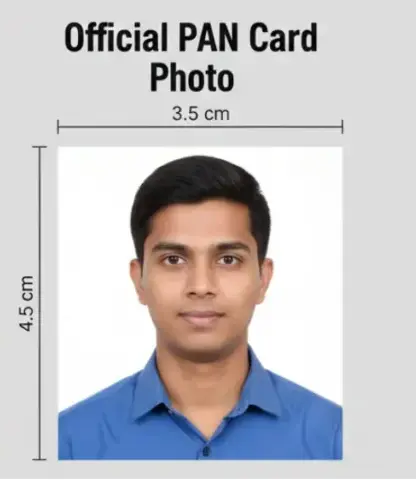
213 x 213 Pixels @ 300 DPI
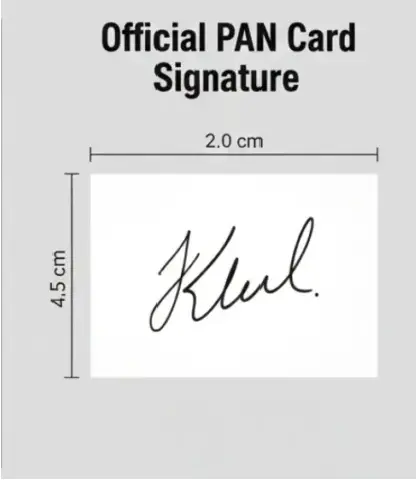
400 x 200 Pixels @ 600 DPI
📸 Photo Specifications
| Physical Size | 3.5 cm x 4.5 cm |
| Pixel Size | 213 x 213 Pixels |
| File Size | 20 KB - 50 KB |
| Background | Plain White |
| Face Coverage | 70-80% of Photo |
✒️ Signature Specifications
| Physical Size | 4.5 cm x 2.0 cm |
| Pixel Size | 400 x 200 Pixels |
| File Size | 10 KB - 20 KB |
| Ink Color | Black Ink Only |
| Status | Approved Dimensions |
What This PAN Card Resizer Tool Does:
This tool prepares PAN Card files that meet official Income Tax Department guidelines, including:
PAN Card photo resizing & cropping
PAN Card signature resizing
Document compression without quality loss
Automatic file size adjustment (KB limits)
Correct width, height & aspect ratio
Clear image output with proper DPI
You can download files that are ready for direct upload on NSDL or UTI PAN application portals.
Pan card resizer - frequently asked questions
What are the official PAN card image sizes?
Based on the latest specifications, the photo should be 213x213 pixels (300 DPI) and the signature 400x200 pixels (600 DPI). Our pan card resizer uses these as default presets.
Is this tool compatible with NSDL and UTIITSL portals?
Yes, the pan card photo resize output is specifically designed to meet the requirements of both NSDL (Protean) and UTIITSL online portals. Once you resize, you can upload the JPEG directly.
Do you keep copies of my images?
No. Everything runs in your browser - we never see or store your images. Your pan resize is completely private and secure.
Can I use this tool for bulk applications at a CSC center?
Absolutely. Common Service Center (CSC) operators and VLEs can use our pan card resize tool for multiple clients quickly without needing heavy photo editing software.
Does this match the 3.5cm x 4.5cm physical size?
Yes. When you set the pan card photo size to 213x213 pixels at 300 DPI, it translates exactly to the 3.5 cm x 4.5 cm physical requirement mentioned in the application form.
What are the background and ink requirements for PAN?
For the photo, use a plain white background. For the signature, always use black ink on a white background for better clarity.
How do I ensure the file size is between 20KB and 50KB?
Our pan card photo resize algorithm optimizes the JPEG compression to help you stay within the 20KB-50KB range for photos and 10KB-20KB for signatures.
Can I resize my PAN photo using a mobile phone?
Yes. You can take a photo of your passport picture or signature with your phone, upload it to our resizer, and download the processed version ready for upload.
Is there a limit on file size or usage?
None. You can use this pan card photo size tool as many times as you want, completely free of charge.
Does the tool support PDF to JPEG conversion?
This specific tool is a resizer for image formats (JPEG/JPG). If you have a PDF, you will need to convert it to an image first before using this tool to set pixels and DPI.